AI makes automation easier in two ways: it helps us build the software, and it can make decisions while that software runs. I would start with ordinary code and supported APIs, then add AI during execution only where the task needs interpretation or flexible decisions.
Those two roles give us four useful levels of AI automation. In the first two, AI helps you build and repair the automation, but the result runs as ordinary code. In the third and fourth, a model is needed every time the automation runs: in the third, your code decides when to call it; in the fourth, the model also decides the steps. They aren’t a ranking where the highest is best. The right choice depends on what the task needs and what it will cost to build, run and maintain.
The four levels of AI automation
Compare the total cost: building + running + maintenance + mistakes. No model bill doesn’t mean no cost, and a small model call can be cheaper than maintaining a fragile workaround. A lower level is not automatically cheaper overall.
Start with the simplest approach that works
I would try the lower levels first. If ordinary code and an official API can do the job reliably, that is usually where I would start. You avoid paying for model calls on every run, and the behaviour is easier to test and reproduce.
- Start with level 1: Use supported APIs and clear rules wherever they cover the task.
- Consider level 2 when the interface is missing: A browser script or undocumented endpoint can be useful, provided the maintenance effort is acceptable.
- Add level 3 where interpretation is needed: Use a model for the parts that are difficult to express as reliable rules, and keep the straightforward steps in ordinary code.
- Reach for level 4 when the steps themselves vary: Give an agent a goal and tools when you can’t write the sequence down in advance, and keep it inside clear limits.
Why this changes what is worth automating
Quite a few of the things we now call AI automation were already possible before we had LLMs. They just took enough time to build that it often wasn’t worth doing.
If you spend three days automating something that takes five minutes a month, it will take a while to get that time back. (Although that has probably never stopped a developer from trying.)
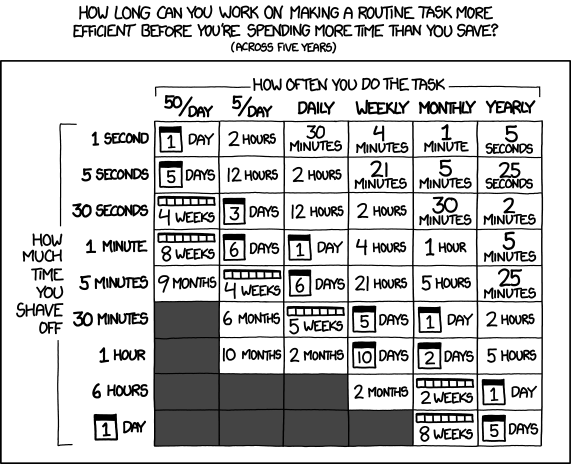
In my experience, AI helps a lot with understanding an API and writing the code to use it. That changes the calculation for smaller tasks. Having AI make decisions during the workflow opens up other possibilities, but it also introduces different costs and dependencies.
Level 1: Using official APIs

Let’s start with the version we’ve been able to do for a long time. You have two systems, both have an official API, and you write some code to connect them. (My Luxafor status light for OBS is a small example of exactly this.)
Maybe a customer fills out a form and you want to create a ticket, assign it to a department based on the selected product and send a confirmation. There are clear rules for what should happen, and the APIs give you a way to do it.
Less time figuring out the API
Most of the work is usually figuring out how these particular APIs behave. How do you authenticate? Which fields are required? What happens when a request fails? And does the documentation actually describe the version you are using?
This is where I’ve found AI useful, whether for an app I built with it or for fixing my controllers instead of buying new ones. You can give it the documentation and let it help you put the integration together. If the system is open source, it can also read the implementation when the documentation leaves something unclear. Sometimes the code is the better documentation, unfortunately.
If the API provides an OpenAPI specification, that gives you a structured description of its endpoints, inputs and responses. You can use it with tools that generate client code, and it gives an AI assistant something more concrete to work from than a collection of examples.
You still have to check whether the result works. But getting to something you can test can be a lot faster.
A supported interface makes maintenance easier
The nice thing about a supported, versioned API is that there is usually a documented process for changes. Depending on the provider, you get a migration guide or time to switch before an old version disappears. It doesn’t mean nothing will break, but at least you have something to work with. GitHub’s API versioning policy is one example.
The AI helped you write it, but it doesn’t have to be involved when a new ticket arrives.
Once your integration is finished, it just runs as normal code.
You can run it on your own server, and if the AI service becomes unavailable, your script keeps working. Of course, the ticket system still needs to be available. We haven’t removed all dependencies, just the need for an LLM during execution.
Level 2: Working with what you have

Now, what if the software doesn’t have an API for what you want to do?
Maybe there is an internal endpoint that the website uses, but nobody documents it. Or the only way to export a report is to log in, select a few options and click a button.
Automating the browser is still an option
You can automate that too. You could inspect the requests the website makes, or write a browser script that follows those steps. We’ve been doing this for years as well, but figuring it out and maintaining it could take quite a bit of work.
A tool such as Playwright can control a browser from code. That gives you a practical way to implement these steps without having a model decide what to do on every run.
AI can help you investigate how the site works, write the script and figure out what went wrong when it stops working.
The part you will probably have to fix
Because it probably will stop working at some point. Someone redesigns the page, changes a field or replaces the endpoint. Your script was depending on something that was never promised to stay the same.
That doesn’t automatically make it a bad idea. For an internal tool you are allowed to automate, where a report arriving a day late isn’t an emergency, it might be perfectly reasonable. You just need to budget for repairs and avoid putting unnecessary load on the system.
I would also check that the result is actually correct. A script that crashes is annoying, but one that happily downloads the wrong report every week can be worse.
The script can still run on its own
The useful part is that this can still run without an LLM. AI helps you build the browser script, and perhaps repair it later, but the script itself follows predefined steps. You don’t need to ask a model where the export button is every Monday morning.
Level 3: Having AI take part in the process

There are also tasks where writing down all the rules becomes difficult.
Take the ticket example again. Assigning a department based on a dropdown is straightforward. Understanding a customer’s description of a problem, finding relevant information and preparing a useful reply is a different task.
You could try to cover everything with keywords and rules, but that gets complicated quickly. This is where it can make sense to have a model involved while the workflow runs.
A ticket workflow with AI
For example, the workflow could look like this:
- Read the ticket: AI interprets the customer’s description.
- Suggest a department: AI proposes who should handle it.
- Draft a response: AI prepares an answer for review.
- Check and send: A person reviews the draft and sends it.
You could also let it send an approved troubleshooting suggestion automatically for a narrow set of low-risk problems. If that resolves enough tickets, it could save quite a bit of work. But you would want to measure whether it actually helps, and make sure unresolved tickets still reach a person.
Your code is still in charge
Notice who decides the order of those steps: you do. The model is called at fixed points, does one bounded job and hands back to your code. That keeps it testable, because the same ticket runs through the same path every time. If the model also gets to decide what happens next, that is a different thing, and I’d give it its own level.
Now the model has to be available
The downside is that you now need the model for the process to work as intended. If you use a hosted model and the provider is unavailable, the affected part has to wait or fall back to something else.
You can prepare a second provider, but switching isn’t necessarily as simple as changing the API address. You have to check that the other model works well with your prompts, tools and actual tasks. Running a model locally is another option, although then you get to maintain that as well.
There is also a cost for every run. A single request might be cheap, but a workflow that makes many calls, retries several times and processes thousands of tickets can add up.
Faster decisions with a specialised model
For some of these steps, a specialised decision model might be enough. Jev from TypeSafe takes context and specific questions, then returns choices, scores or probability values that your code can use directly. It doesn’t write the reply to the customer, but it could help decide where their ticket should go.
That could be useful for questions such as:
- Which department should handle this ticket?
- Which of these available tools should run next?
- Does this request need a person to review it?
Jev might make those small decisions cheaper and faster than using a general-purpose language model for each one. TypeSafe lists input-only pricing of $0.042 per million tokens for Jev 1.13 and 1.14 as of October 2026. Vercel also reports TypeSafe’s speed and cost comparisons, although those are vendor results from particular workflows.
I would test it on the actual task before assuming the same savings. The interesting number is the cost of getting a useful decision, including mistakes and retries. You could use Jev for routing, a language model for drafting, and a person for difficult cases. That still belongs to level 3: a model is needed while the workflow runs.
If you want to get a feel for it, AskJev lets you try questions in your browser.
More flexibility still needs checks
What you get in return is flexibility. The model may be able to deal with variations that your script would fail on. It can also ask a person for help, if you’ve built that into the workflow.
I wouldn’t rely on it always knowing when it’s wrong, though. You still need limits on what it can do and points where a person reviews the result, especially if fixing a mistake would involve more than rerunning a report.
Level 4: Letting an agent decide the steps

Sometimes even the sequence of steps isn’t something you can write down in advance. A customer reports that “exports have been broken since Tuesday”. Working that out might mean reading the ticket, checking the release notes, looking at the export logs, searching the internal docs and perhaps asking the customer a question, in an order that depends on what each step turns up.
That is where agents come in. You give the model a goal and a set of tools it is allowed to use, and it figures out the steps itself: which tool to call, what to do with the result, when it is done. Instead of the workflow calling the model, the model drives the workflow. Anthropic’s write-up draws this line between workflows and agents, and it is the line between level 3 and level 4 here.
Built from the other three
An agent isn’t a new kind of integration. Its tools are levels 1 and 2: an official API where one exists, a browser where it doesn’t. Each individual decision it makes is a level 3 model call. What level 4 adds is the loop around them: the model chooses what to do next, repeatedly, until the goal is met or it gives up.
For the ticket example, an agent could gather the context and propose a fix for a person to review, where a fixed workflow would only have drafted a generic reply. That is a real capability. It is also a lot more surface area.
What you take on
Everything from level 3 still applies, and a few things get harder:
- Cost is harder to predict. A fixed workflow makes a known number of calls. An agent makes as many as it decides it needs, and a confused agent can loop for a while before it notices.
- Testing is harder. The same ticket can take a different path on two runs. You end up evaluating outcomes over many runs rather than checking one path.
- Permissions matter more. An agent that can read logs is useful. An agent that can also close tickets, refund customers or delete records needs a hard boundary that the code enforces, not the prompt. Anything it can’t undo should wait for a person.
- The input can talk back. Tickets, web pages and documents can contain text that tries to steer the model. The agent may follow it; the checks around it must not.
None of that means avoiding agents. It means being clear about when the steps actually vary enough to justify one, and keeping the predictable parts in the lower levels where they are cheaper and easier to trust.
Cheapest to run isn’t always cheapest to maintain
There is a catch with this ordering. Level 2 isn’t automatically cheaper or more stable than level 3. A browser script that breaks every week can cost more to maintain than a small model call connected to a supported API.
So I would compare the whole job: building it, running it, fixing it and dealing with mistakes. Level 1 is a good default when it fits. After that, choose the approach with the least complexity that still does the job reliably. You don’t get extra points for making everything an agent, but you also don’t get them for maintaining a hundred fragile rules.
You can combine the levels of AI automation
The third and fourth levels can use either of the first two kinds of interface. A model inside a workflow, or an agent, can call an official API and can also operate a browser. They aren’t four stages that every project has to pass through.
The distinction I care about is whether AI is helping create the automation or whether it is needed every time the automation runs.
Even here there are variations. You could use a small local model to recognise a button without depending on an external LLM. That is still AI during execution, just with a different set of dependencies.
You also don’t have to write every part from scratch. A workflow tool such as n8n lets you connect services and combine ordinary automation with AI steps. The same question still applies: which steps actually need a model?
How I would put it together
For a ticket system, I would probably combine the approaches:
- Official API: Get the ticket and update its status.
- AI: Interpret the contents and prepare a response.
- Normal code: Check the required fields and pass the result on.
- A person: Review and approve the response.
If the model is unavailable, the ticket can still go into the queue for someone to handle manually.
Outlook: where AI automation and agents are heading
If I look at where this is heading, level 4 is the place where the other levels stop being separate choices. The tools you hand an agent are levels 1 and 2. When there is an official API, the agent calls it. When there isn’t, it can open a browser and click through the same steps a person would.
That second part is what has changed recently. Controlling a browser or a desktop from a model used to be a demo; it is now reliable enough to be a fallback for the systems that never got an API. At the same time, more software is exposing its functions in a form agents can call directly, through standards such as the Model Context Protocol. So the agent gets a growing set of level 1 tools, with level 2 for everything else. Whether the thing behind an MCP tool is a supported API or a browser script still has to be judged separately.
What I find most interesting is the third combination: the agent doesn’t just run the automation, it can also build it. You could ask it to do a task once, watch it work out the API calls or the clicks, and then ask it to write that down as a script. The agent is level 4 while it explores; what it leaves behind is level 1 or 2 code that runs every Monday without a model.
I think that is how I would use agents in the near future:
- Exploration: Let the agent figure out the steps the first time, when you don’t yet know how the system behaves.
- Exceptions: Keep the agent in the loop for the cases that don’t fit the script, where interpretation is actually needed.
- The routine: Freeze the predictable path into ordinary code and let that do the daily work.
The questions from the table don’t go away. An agent that drives a browser on every run combines the fragility of level 2 with the cost and availability concerns of levels 3 and 4, which is a good reason not to leave it there once the path is known. And an agent with the ability to act still needs a clear boundary around what it may do without a person approving it, especially where an action can’t be undone.
But as a way to find the path before you pave it, I expect agents to make a lot more small automations worth building.
Making smaller automations worth building
I think a lot of the interesting change in AI automation will come from making smaller automations worth building: the little repetitive tasks where writing and maintaining the integration used to cost more than doing the work yourself.
And for the parts where understanding the content really matters, we now have another tool to try. I’d just look at each step and decide whether it needs that tool. It’s the same thinking as optimising workflows with shortcuts and custom tools, with a much lower bar for building them.
Sometimes the most useful thing AI can leave you with is a script that no longer needs it.